Have you seen viral videos showing an alarming weather alert for one state? Lead Stories has spotted a number of such posts recently and has found that many of them were created using artificial intelligence. The colorful maps and emergency information are eye-catching and designed to target an audience in a specific state but they do not show real weather alerts.
This article is part of a series of stories examining various types of what is commonly called "AI-slop": short, vertical videos generated with artificial intelligence tools, or in this case, images and info-graphics, with the aim of going viral, often by exploiting the emotions or curiosity of the viewer with made-up content.
What these 'fake severe weather alert' posts look like
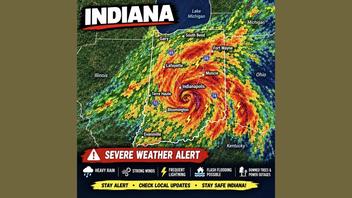
These posts usually have text captions describing the storm: heavy rain, strong winds, frequent lightning, and dangerous storm conditions. They describe the way the storm will impact communities such as: flash flooding, downed trees, debris, and power outages. The caption will list several of the main cities in that state by name. The AI-generated map of the state shows an eye-catching weather radar graphic and the names of key cities in the state. The graphic may also contain tips like, "stay safe" and "check local updates," but one important detail is missing: when the storm is expected to hit. The posts are crafted to be perpetually urgent.
Some examples
One example post (archived here) shows a map of Indiana with a radar image that appears to be a hurricane.
Another example shows the state of Florida (archived here). Although hurricanes are more common there, they were not forecast at the time of writing.
This example has named the storm like a locomotive, the Texas Express (archived here).
This post (archived here) with a map of New Jersey shows an alert for a storm system caused by an atmospheric river.
Keywords
These posts follow a programmatic formula where the name of the state and the major cities of the state are swapped out, but the remainder of the post follows the same pattern.
There may be descriptions of what the storm will do:
- Flash flooding
- Downed trees
- Debris
- Power outages
- Gusty/damaging winds
- Coastal flooding (coastal states)
As well as general tips to help the residents ride out the storm:
- "Stay alert"
- "Keep an eye on local weather updates"
- Avoid flooded roads
- Never drive through standing water
- Secure outdoor furniture
- Charge devices
Specific dates are not included in the alerts, and the state-specific warnings will list the cities in the state -- but the alerts do not mention how the storm will move through the surrounding states.
The state's name will appear in the hashtags coupled with "weather" or "storm": #IndianaWeather, #TexasWeather, #FloridaStorm. A state nickname may be included, #HoosierState, #SunshineState or #GardenState, and then coupled with other generic weather hashtags, #SevereWeather #StormAlert #StaySafe #WeatherUpdate, #FlashFlood, #FloodWarning and #StormSeason.
How to tell they are false
These fake weather reports come from a network of Facebook pages and groups targeting state-specific American audiences but based in Bangladesh. The best way to be sure weather information is true is to go directly to a trusted source. The National Weather Service (NWS) has an "Alerts" page (archived here) which has a tool to customize a weather report by zip code. There is also a list of types of alerts that may be issued and each will open the specific NWS alerts page for issues such as: Excessive Rainfall, National River Flooding, Thunderstorm/Tornado Outlook, Hurricanes, and Fire Weather Outlooks.
There are also errors in the AI-generated maps that would tip off many state residents and geography buffs. Some have been compressed to fit into the format of the post, and some have the names of the cities in the wrong locations. An example can be seen in the New Jersey atmospheric river post embedded above: the location for the city of Trenton is marked as New Brunswick, and New Brunswick should be closer to Newark.
The pages making these posts have names like: Florida Life, and Only In Texas, and the groups where the posts appear have names like I Grew Up In Utah and Life In Louisiana. Facebook's page transparency report for some of these pages shows page managers in Bangladesh (pictured below), but many of them are not marked.
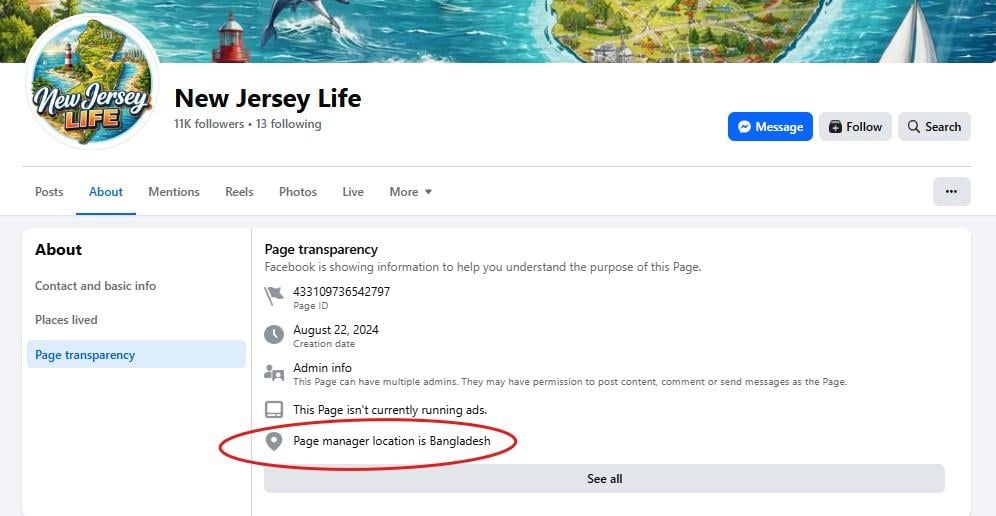
(Image source: Page transparency report for New Jersey Life on Facebook.)
The photos page of the Facebook page may show a superficial stereotype of the state rehashed over and over in AI-generated memes. The example pictured below shows the outline of Indiana, the state flag, water towers, water towers painted with the state flag, "Welcome to Indiana" signs, windmills, red barns, and cornfields in the foreground with a city in the distance. Tucked in this array of state-specific AI-slop are maps with fake weather alerts and earthquake reports.
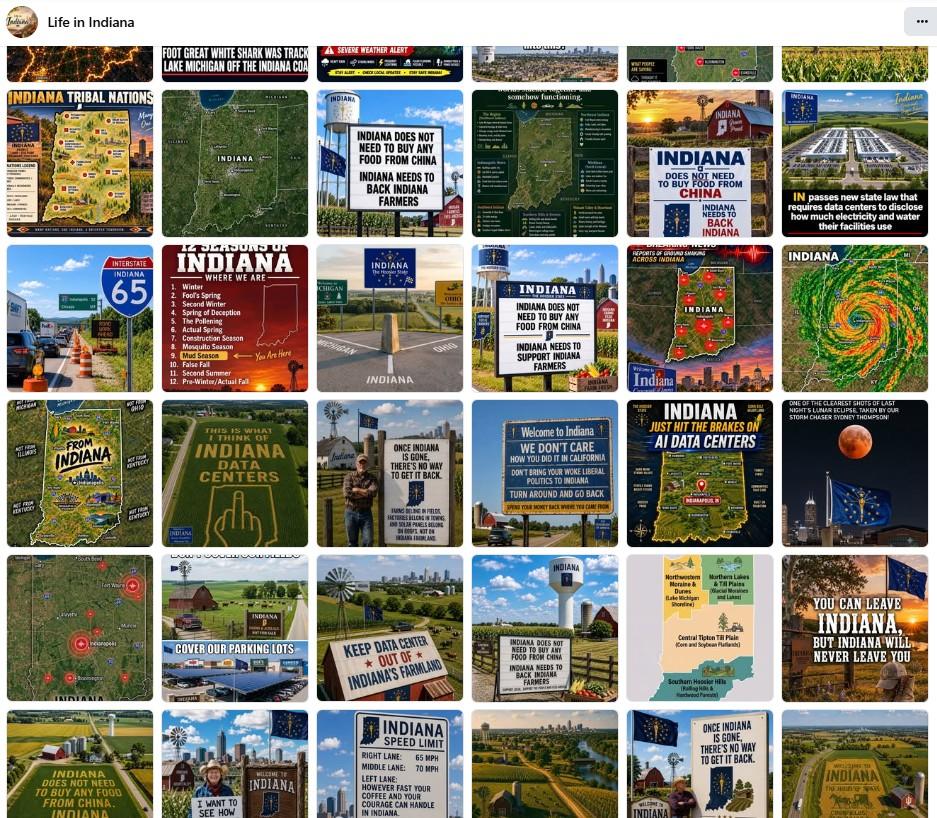
(Image source: photos page from Life in Indiana on Facebook.)
Some of the posts carry an "AI content" disclaimer that opens to an explainer from Meta. In the Florida example (pictured below), the pop-up window says:
Content in this post may have been created with AI
This is based on a signal added by the tool used to create the content. This signal typically identifies content that was entirely AI-generated instead of content that was only modified with AI.
Helping you identify AI content
We add a label when a signal indicates that content is entirely AI-generated. Not all AI content contains the data we need to identify it. We share information about AI use in the post's menu.
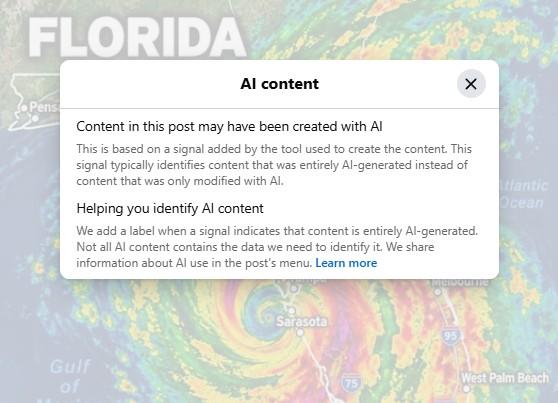
(Image source: post by Florida Life on Facebook.)
Pay attention to the comments under the post: someone may have called it out, or there may be a community note. Sometimes searching Facebook for a small phrase used in the post will bring up a bunch of nearly identical posts targeting other states or dating back several months.
First, look for AI-disclaimers added by the platform or the poster. On TikTok they might say "Contains AI-generated media" or "AI-generated" (archived here), on X they read "Made with AI" (archived here) and on Facebook/Instagram they often say "AI info" (archived here). Check the description of the video too: in some cases the creator might have added a note or a hashtag like #AI, #madewithAI or #fiction. Do not forget to check the main page of the account that posted the video either: maybe there is a disclaimer in the bio and in some cases AI use is really obvious when an account is posting dozens and dozens of variations of the same type of video.
Finally, use common sense: if the post shows an event that would otherwise be newsworthy, use a news search engine to check if it has been reported on by a news service you trust.
Unsure about a video or post? Email [email protected] and we will take a look!
These materials were developed in 2026 for the Prebunking at Scale project, with support from the European Fact-Checking Standards Network. If you share this on social media, use #prebunkingatscale.