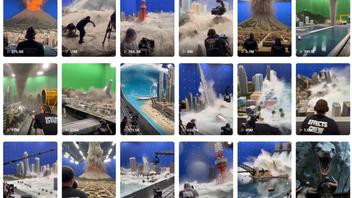
Have you seen viral videos showing elaborate movie sets of small-scale cities and landscapes where the crew creates special effects -- explosions and natural disasters -- in front of a blue or green screen? Lead Stories has spotted a number of such videos recently and found that many of them were created using artificial intelligence. They do not show real people working on a real special effects movie set, but are AI-generated entertainment capitalizing on interest in how special effects are done.
This article is part of a series of stories examining various types of what is commonly called "AI-slop": short, vertical videos generated with artificial intelligence tools with the aim of going viral, often by exploiting the emotions or curiosity of the viewer with made-up content.
What these 'VFX behind the scenes' videos look like
The videos usually show a large set with a blue or green screen in the background, overhead rigging for lights and a large diorama in the middle built to scale. A crew of people, mostly white men dressed uniformly, operate cameras mounted on booms, tracks and dollies while other technicians operate the special effects elements of the set, which may include explosions, a wave pool or an earthquake. The audio will typically include a voice shouting the types of things a director might say -- action, keep rolling, that's a take or cut. Realistic sound effects may accompany artificial action on set, like the roar of a fighter jet engine when a model plane is just hanging by strings.
Some examples
@behind_the_vfx Miniature tanker hits the barrier and rolls! 🚛💥 Practical fire and smoke bring the crash to life. 🔥 Real fire crew steps in after 'CUT!' 🎬 #PracticalVFX#HollywoodBTS#MiniatureVFX#TankerCrash#BehindTheScenes♬ original sound - Behind The VFX
A video uploaded to TikTok on Aug. 6, 2026, by @minimechfx shows a fiery plane crash into a harbor upon takeoff.
@minimechfx Mind-Blowing Practical FX: Miniature Airplane Crash & Fire Explosion Breakdown 🎬✈️ #PracticalEffects #BehindTheScenes #MovieMagic #Filmmaking #PracticalFX #AirplaneCrash #PlaneExplosion #MiniatureSet #ScaleModel #HollywoodFX #SpecialEffects #BTS #ViralShorts #FYP ♬ original sound - MiniMechFX
Another video uploaded to TikTok on Aug. 12, 2026, by @scenevault2.0 has a split screen that uses AI to deceptively show both how the finished scene appears and how the effect was accomplished with a blue screen.
@scenevault2.0 Was This Helicopter Rope Stunt REAL or Just Movie Magic? #VFXReveal #BehindTheScenes #MovieMagic #StuntWork ♬ original sound - zaynixx
Keywords
Here are hashtags often associated with videos like these: #PracticalEffects #PracticalFX #SpecialEffects #PracticalVFX #HollywoodFX #MiniatureVFX #BehindTheScenes #BTS #HollywoodBTS #Filmmaking #MovieMagic #MiniatureSet #ScaleModel #Miniatures #AirplaneCrash #PlaneExplosion #TankerCrash #ViralShorts #viral #FYP #Hollywood
How to tell they are false
Many of the videos have glitches typical of AI-generated content. For example, elements may suddenly appear or vanish. In the tanker crash video, a sports car appears from the rubble as the tanker's impact shatters a concrete barrier. When the tanker rolls and explodes, the large red semi cab vanishes, then miniature firemen rush to put out the fire.
In the plane crash example, when the plane hits the control tower at the end of the runway a police boat with flashing lights suddenly appears, flying through the air, and comes splashing down into the miniature harbor. AI video generators tend to focus on the central subject of the scene, leaving the background action wanting. Members of the film crew are not depicted as individuals -- the crew members appear identical to one another in clothing, build and features -- with many just standing around and looking busy.
In some cases, the account's homepage will contain clues to the production-line nature of making videos with AI. The video thumbnails may appear very similar, as if part of a series, likely generated from the same AI prompt with minor changes. Sometimes the account's AI-generated content of one genre suddenly switches to another trend. On TikTok, @behind_the_vfx was posting videos of animated fruit characters. It briefly switched to parents of toddlers, before the current VFX theme (below left). Before @scenevault2.0 took on the VFX theme, they were publishing "insect wars" videos (below right). Additional AI-generated video themes on this account featured soccer stars, superheroes and matchstick art that goes up in flames.
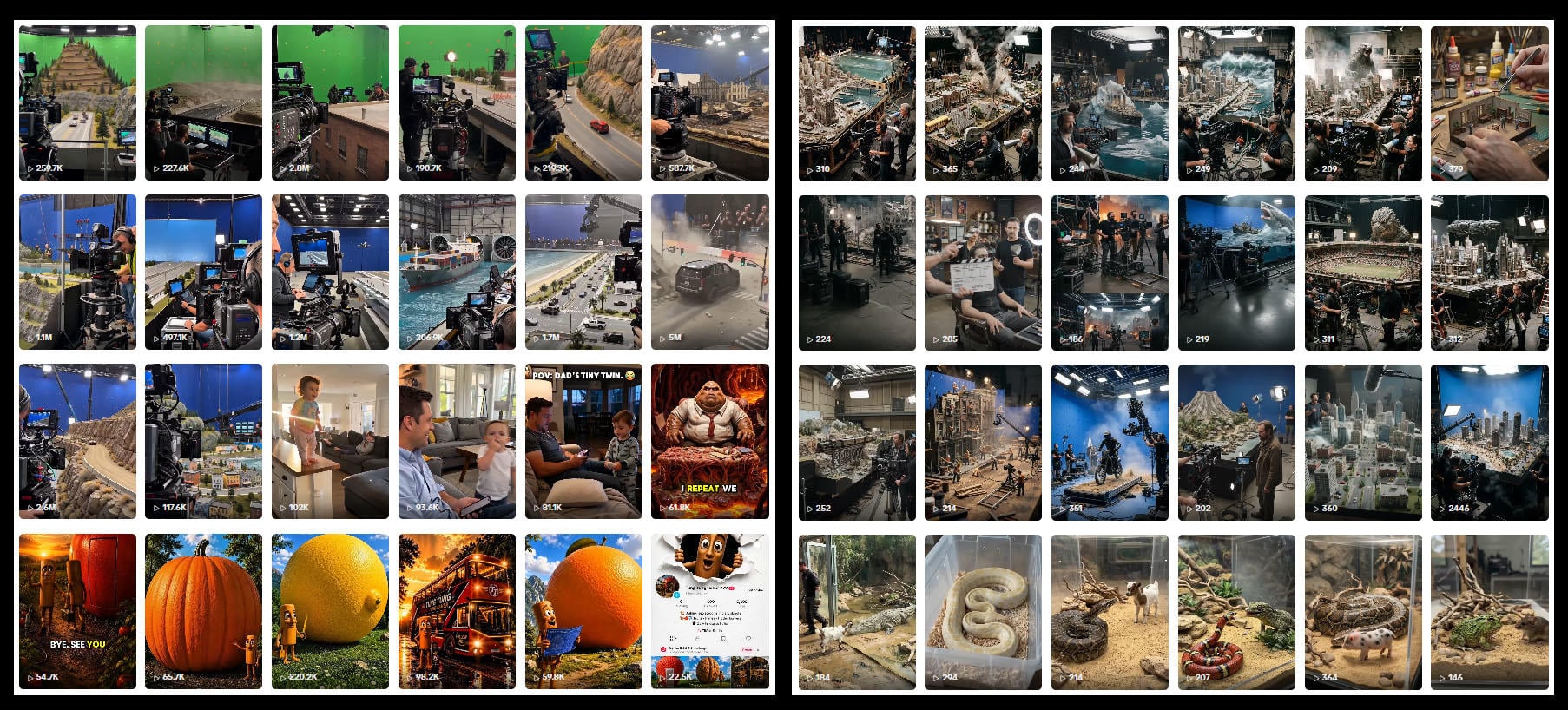
(Image source: @behind_the_vfx and @scenevault2.0 accounts on TikTok.)
Videos like these are designed to catch attention and entertain curiosity about how movie special effects might be accomplished.
If you see videos like these on social media, here are some things you can try.
First, look for AI disclaimers added by the platform or the poster. On TikTok they might say "Contains AI-generated media" or "AI-generated" (archived here), on X they read "Made with AI" (archived here) and on Facebook/Instagram they often say "AI info" (archived here). Check the description of the video too: In some cases the creator might have added a note or a hashtag like #AI, #madewithAI or #fiction. Don't forget to check the main page of the account that posted the video either: Maybe there is a disclaimer in the bio and in some cases AI use is really obvious when an account is posting dozens and dozens of variations of the same type of video.
Don't stop at the account that posted the video: Maybe they copied it from somewhere else. Use a tool to take a screenshot of the first frame of the video and run it through a reverse image searching tool to see where else on the internet it appears. It may have originated on an account that posts satire, AI creations or actual art.
If you are still not sure, try downloading the video itself. There are several AI detection tools that can tell you if there are watermarks or other technical characteristics present in the video that would indicate it was likely made with AI.
Finally, use common sense: If the video shows an event that would otherwise be newsworthy, use a news search engine to check if it has been reported on by a news service you trust. Also pay close attention to the video itself: look for physical impossibilities or glitches typical of AI-generated footage like:
- People or things appearing (or disappearing) out of thin air
- Objects behaving in physically impossible ways (heavy objects falling slowly, rigid objects bending ...)
- Garbled writing, oddly shaped letters or signs
- People or objects blending into or moving through each other
- Inconsistencies between different shots of the video (extra architectural elements in buildings, changing backgrounds, differences in clothing or hairstyle)
- An audio track that sounds strange: flat, unnatural speech, scripted-sounding yelling from bystanders ("Did you see that? OMG!"), sound effects being out of sync with events.
Unsure about a video? Email [email protected] and we will take a look!
These materials were developed in 2026 for the Prebunking at Scale project, with support from the European Fact-Checking Standards Network. If you share this on social media, use #prebunkingatscale.